FHIR Eswatini Adaptor
Language support for the Eswatini National Health Information Exchange FHIR Implementation Guide.
This adaptor is generated from the Eswatini FHIR Implementation Guide (IG), which means it understands Eswatini-specific profiles, extensions, and value sets. It is designed to make writing FHIR-conformant job code as simple as possible.
About FHIR
FHIR stands for Fast Healthcare Interoperability Resources. It is a standard for representing and exchanging healthcare data electronically.
Learn more about FHIR and FHIR for heath data exchange.
Authentication
See this adaptor's Configuration docs for the required authentication parameters.
See platform docs on managing credentials for how to configure a credential in OpenFn. If working locally or using a Raw JSON credential type, your configuration will look something like this:
{
  "baseUrl": "https://hapifhir.eswatinihie.com",
  "apiPath": "fhir"
}
How This Adaptor Helps
One of the major aims of the fhir-eswatini adaptor is to make it easier to
define FHIR resources.
Writing conformant FHIR resources by hand is verbose. The raw JSON for basic Patient looks something like this:
{
  "resourceType": "Patient",
  "meta": {
    "profile": [
      "https://hapifhir.eswatinihie.com/fhir/StructureDefinition/SzPatient"
    ]
  },
  "identifier": [
    {
      "use": "official",
      "type": {
        "coding": [
          {
            "system": "https://hapifhir.eswatinihie.com/fhir/CodeSystem/SzPersonIdentificationsCS",
            "code": "PI",
            "display": "Personal ID Number"
          }
        ]
      },
      "system": "http://homeaffairs.sys",
      "value": "1999001000000"
    }
  ],
  "name": [{ "family": "Gule", "given": ["Jacob", "Samuel"] }],
  "gender": "male",
  "birthDate": "1990-01-01",
  "extension": [
    {
      "url": "https://hapifhir.eswatinihie.com/fhir/StructureDefinition/SzInkhundlaExtension",
      "valueCodeableConcept": {
        "coding": [
          {
            "system": "https://hapifhir.eswatinihie.com/fhir/CodeSystem/SzTinkhundlaCS",
            "code": "3",
            "display": "LOBAMBA"
          }
        ],
        "text": "LOBAMBA"
      }
    }
  ]
}
But with the fhir-eswatini adaptor, all we have to write is:
b.patient({
  identifier: {
    use: 'official',
    type: 'PI',
    system: 'http://homeaffairs.sys',
    value: '1999001000000',
  },
  name: [{ family: 'Gule', given: ['Jacob', 'Samuel'] }],
  gender: 'male',
  birthDate: '1990-01-01',
  inkhundla: 'LOBAMBA',
});
The "builder function" b.patient() handles the profile URL, the full
identifier type coding, and the extension structure automatically. It also
provides convenient facilities for mapping values from the incoming data
source - so instead of something like this:
state.patient = {
  // Use a custom map to translate source to target values
  inkhundla: lookups.region2inkhundla[state.patient.region]
}
You can just do this:
state.patient = b.patient{
  inkhundla: state.patient.region
}
This means that workflow code which maps information into fhir resources is simpler and cleaner, with less fiddly syntax and logic. It's easier to write, easier to read, easier to reason about, and easier to modify.
User Guide
Builder functions
All builder functions are available on the b (short for builders) namespace.
There is a builder for every resource type in the Eswatini IG: such as
b.patient(), b.encounter(), b.observation(), b.condition() and so on.
See the reference docs for the full
list.
Pass a plain object with the properties you want to assign to the resource:
const patient = b.patient({
  gender: 'male',
  birthDate: '1990-01-01',
});
Some resource types, like Observation, support multiple profiles. Pass a profile name as the first value to these builders:
const patient = b.observation('SzLabResult', {
  code: 'CD4',
});
The in-app code-editor provides full code-complete (typeahead) on all functions, including profile names.
Builders are not operations themselves, so you can't use the at the top level of
your job code. Pass them as an argument to an operation like
create(b.patient(...) or addToBundle(b.patient(...)), or use them inside a
callback:
fn(state => {
  state.patient = b.patient(state.data);
  return state;
});
Bundling
The fhir-eswatini adaptor provides API support to create, manage and upload
bundles.
addToBundle(
  b.patient({
    gender: 'male',
    birthDate: '1990-01-01',
  })
);
uploadBundle();
The final uploadBundle() function will generate correct URLs for each entry,
and sort entries by dependency order.
See the base fhir-4 docs for details of the createBundle, addToBundle and
uploadBundle functions.
Value mapping
FHIR data structures are very verbose. In many cases, complex structure values can be mapped to a simple string values.
For example, an Encounter resource has a class property to specify the
location the encounter took place:
b.encounter({
  class: {
    code: 'OPD',
    display: 'Outpatient Department',
    system:
      'https://hapifhir.eswatinihie.com/fhir/CodeSystem/SzEncounterClassificationCS',
  },
});
Using value mappings generated from the Eswatini IG, we can accept a short-hand string value in the builder which will expand this whole structure internally:
b.encounter({
  class: 'OPD',
});
The builder knows the that class property of encounter is bound to a
particular value set. So it will automatically try and lookup a string value
against the list of known codes. If it finds one, it'll replace the string with
the full object definition above.
This mapping applies to any property or extension for which the IG specifies a value set.
For example, an identifier's type accepts a short code from the Eswatini
Person Identifications code system:
b.patient({
  identifier: {
    type: 'PI', // expands to a full CodeableConcept
    system: 'http://homeaffairs.sys',
    value: '1999001000000',
  },
});
Expands to:
b.patient({
  identifier: {
    type: {
      coding: [
        {
          system:
            'https://hapifhir.eswatinihie.com/fhir/CodeSystem/SzPersonIdentificationsCS',
          code: 'PI',
          display: 'Personal ID Number',
        },
      ],
    },
    system: 'http://homeaffairs.sys',
    value: '1999001000000',
  },
});
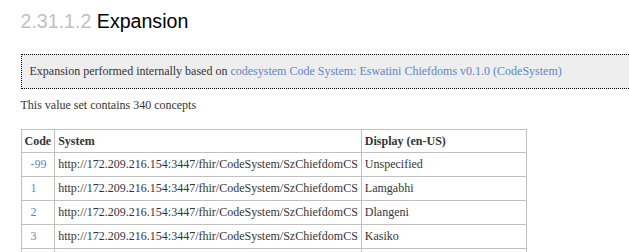
To know the range of values allowed, follow the links in the docs to the value set definition (the docs will link you straight into the Implementation Guide). Any Code or Display value declared on that page is accepted.
If a mapping fails, the value you passed in will be fed through the final FHIR resource, unmapped and untouched.
Custom Value Mapping
You can also define your own value mappings. This is useful when mapping your input data into FHIR. Just declare the mappings at the top of your job code with the correct URL and whatever values you want.
b.setValues(
  // get the value set URL from the docs
  'http://172.209.216.154:3447/fhir/ValueSet/SzTinkhundlaVS',
  // Define your own mappings, where the key is the code value passed to
  // to the builder, and the value is whatever should be mapped
  // In this example, we want to map an inkhundla name to the code
  {
    mbabane: {
      system: 'https://hapifhir.eswatinihie.com/fhir/CodeSystem/SzTinkhundlaCS',
      code: '264',
      display: 'MBABANE',
    },
  }
);
::: tip
Because it is a plain Javascript function, not an Operation, b.setValues can
only be used inside a callback or fn block.
fhir-eswatini v0.6.0 provides a setMappings operation, with the same API as
setValues, which allows value maps to be set from the top level of your job
code.
:::
Custom mappings like this do not override the default system values. In fact, your custom mappings are expanded first and THEN the system mappings cut in - so you can declare custom mappings which map right to codings, which will then be expanded:
b.setValues(
  'http://172.209.216.154:3447/fhir/ValueSet/SzTinkhundlaVS',
  // Map to the code, and let the default mapping expand the full extension
  {
    mbabane: '264',
  }
);
Now your job code can do:
b.patient({
  inkundla: 'mbabane',
});
If you declare mappings relative to the format of your source data, you can declare the value based on your data without complex mapping code
b.patient({
  inkundla: $.patient.district, // mapping from a different dataset
});
Extensions as properties
Eswatini-specific extensions are exposed as simple named properties on the relevant builders, instead of requiring you to construct extension objects manually.
For example, for the Patient resource, supported extension properties are:
| Property | Extension |
|---|---|
inkhundla | SzInkhundlaExtension |
chiefdom | SzChiefdomExtension |
registrationDate | SzRegistrationDate |
Pass a code value and the builder constructs the full extension:
b.patient({
  inkhundla: '3',
  chiefdom: '7',
  registrationDate: '2025-06-01T10:00:00Z',
});
{
  "extension": [
    {
      "url": "http://172.209.216.154:3447/fhir/StructureDefinition/SzInkhundlaExtension",
      "valueCodeableConcept": {
        "coding": [
          {
            "system": "https://hapifhir.eswatinihie.com/fhir/CodeSystem/SzTinkhundlaCS",
            "code": "3",
            "display": "LOBAMBA"
          }
        ],
        "text": "LOBAMBA"
      }
    },
    {
      "url": "http://172.209.216.154:3447/fhir/StructureDefinition/SzChiefdomExtension",
      "valueCodeableConcept": {
        "coding": [
          {
            "system": "https://hapifhir.eswatinihie.com/fhir/CodeSystem/SzChiefdomCS",
            "code": "7",
            "display": "Lobamba"
          }
        ],
        "text": "Lobamba"
      }
    },
    {
      "url": "http://172.209.216.154:3447/fhir/StructureDefinition/SzRegistrationDate",
      "valueDateTime": "2025-06-01T10:00:00Z"
    }
  ]
}
Multi-profile resources
Some FHIR resource types have multiple Eswatini profiles. For these, pass the profile name as the first argument to the builder.
Observation
The observation builder accepts one of SzCauseOfDeath,
SzClinicalObservation, SzLabResult, SzMannerOfDeath, or SzVitalSigns:
b.observation('SzVitalSigns', {
  status: 'final',
  subject: 'Patient/123',
});
ServiceRequest
The serviceRequest builder accepts one of SzLabRequest or SzReferral:
b.serviceRequest('SzReferral', {
  status: 'active',
  intent: 'order',
  subject: 'Patient/123',
});
Finding More Examples
The size and complexity of FHIR implementations can make it hard to document effectively.
The design of the builders is to be intuitive: pass any reasonable value to a key and the builder should do the right thing with it.
If you're not sure, and the API reference documentation isn't clear, the best places to get help are:
- Look at the unit tests for the resource you are building. These are hand written and have many examples of mapping values (the unit tests are how we validate that the different mappings work!)
- Look at the source code of the builder function you are using. The builders are quite verbose and you should be able to see how your input data is processed. Check that the key you want is supported, and check how the value is processed (is it value mapped? Is it sent to another builder?)
Adaptor Implementation
The fhir-eswatini adaptor is automatically generated from an implementation
guide.
All builder functions, reference documentation and typings are generated from details in the specification according to specific usage patterns and templates.
Some parts of the adaptor, like the main operations, core datatype builders, and unit tests, are hand-written.
The ability to generate adaptor code means that the adaptor can be updated to changes in the specification within minutes. It also ensures that the generated code is comprehensive and accurate.
But bugs in the generation process can result in errors, and the sheer scale of code generated means that test coverage can be lacking.
OpenFn adaptors are open source and we welcome contributions. See the Adaptors Wiki to learn how to update an adaptor, or ask on the OpenFn Community Forum.